
Lufeiya 47" LED Gaming Desk Review: Storage, Outlets and RGB in One Compact Desk
This post contains affiliate links. As an Amazon Associate, we earn from qualifying purchases at no extra cost to you. Learn more.
Key specs
- Brand
- Lufeiya
- Dimensions
- 47.2" W x 18.9" D x 34.3" H
- Power
- 2 AC outlets + 2 USB ports
- Lighting
- RGB LED strip, 7 colors, 4 dynamic modes
- Storage
- 6 open shelves, side bag, 2 hooks
- Materials
- FSC-certified wood top, powder-coated metal frame
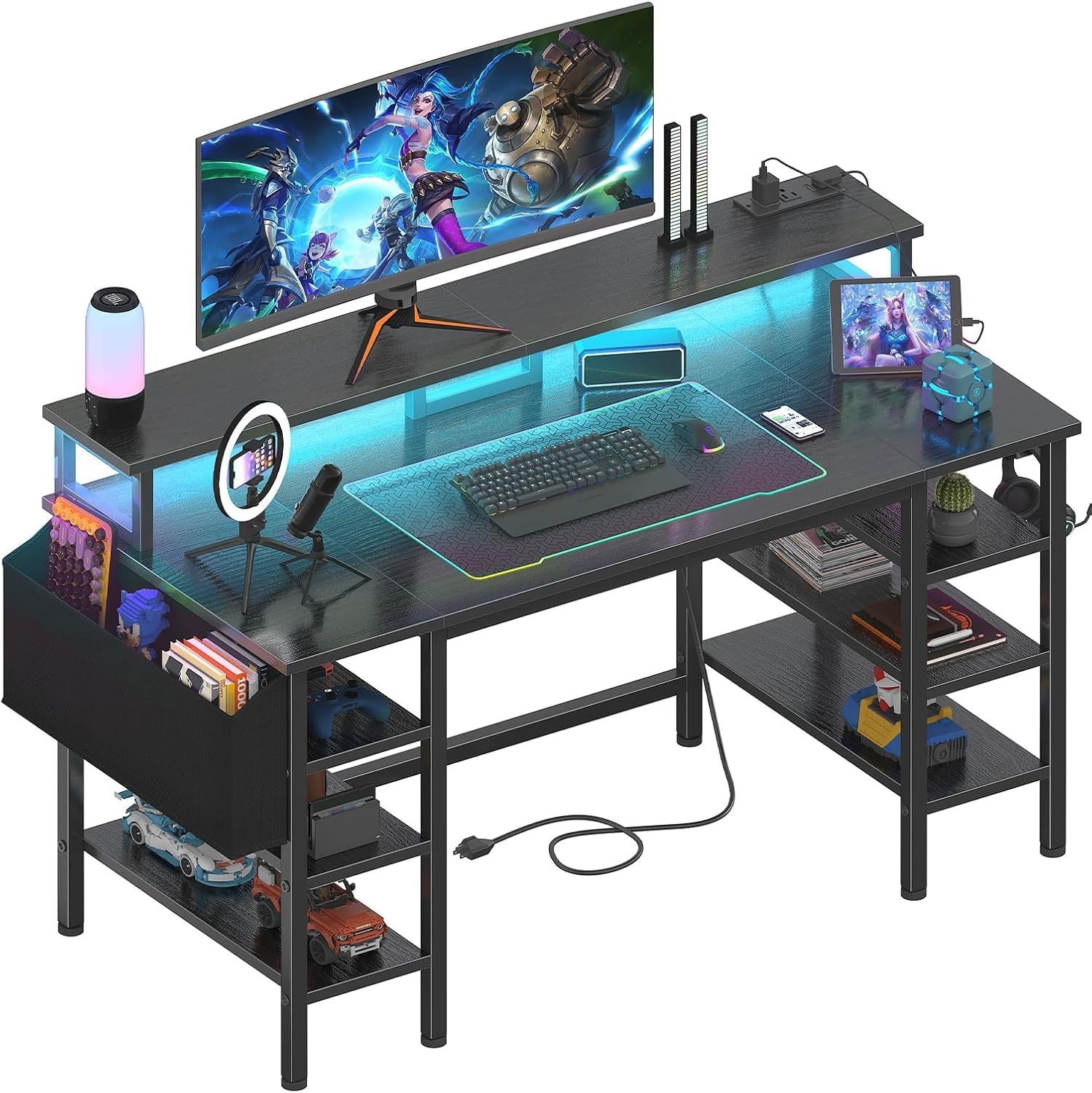
Small rooms make gaming setups hard. You need space for a monitor, a place for games and gear, somewhere to plug everything in, and it should look good too. The Lufeiya 47-inch Gaming Desk crams all of that into a compact footprint: a monitor riser, six open shelves, a built-in power strip with USB ports and RGB LED lighting.
It holds a 4.5-star rating from about 260 buyers, many of whom highlight how well it fits smaller bedrooms.
Who it's for
- Gamers in small bedrooms or apartments who need storage without adding a separate bookshelf.
- Students and home-office workers who want a desk that switches from work to play.
- Dual-monitor or laptop-plus-monitor setups. The riser can hold two monitors or laptops.
- Anyone tired of power strips on the floor. The outlets are built into the desk.
What we liked
- Built-in power strip. Two AC outlets and two USB charging ports right on the desk for your PC, monitor, phone and controllers.
- RGB LED lighting. Seven colors, four dynamic modes and 16 static options give it that gaming-room glow.
- Monitor stand for better posture. Raising your screen to eye level helps reduce neck strain during long sessions.
- Lots of storage for its size. Six open shelves plus a side storage bag and two iron hooks for headphones or bags.
- Easy to assemble. Buyers praise the clear instructions, and the tools are included.
- Good looks. Several buyers call it "cute" for small bedrooms, with a clean, modern black finish.
What could be better
- Sturdiness is mixed. Most find it solid, but some say it wobbles, especially on uneven floors or if bolts aren't fully tightened.
- LED strip adhesion. The most common complaint: the light strips don't always stay stuck. A few pieces of extra double-sided tape or clips fix it.
- 18.9-inch depth is shallow. Fine for a monitor and keyboard, but tight if you want a large monitor pushed far back or a big mousepad plus a keyboard.
- Open shelves collect dust. No doors or drawers.
Key specs, explained
- 47.2" wide: room for a monitor or two small ones, plus a keyboard and mouse. It's not a sprawling battlestation.
- 34.3" tall (with riser): the desktop itself sits at standard desk height, with the monitor stand raising screens above it.
- FSC-certified wood top, metal frame: a responsibly sourced top on a powder-coated steel base.
Setup tips
- Tighten all bolts twice. Snug them during assembly, then go round again after a day of use. It dramatically reduces wobble.
- Use a level and adjust or shim the feet if your floor is uneven.
- Reinforce the LED strip with clear mounting clips or 3M tape before you peel off the original backing.
- Route cables along the frame with zip ties so the power strip stays clean.
- Put heavy items on lower shelves to keep the center of gravity low.
How it compares
Gaming desks usually trade storage for size. Big L-shaped battlestations have space but no shelves, and compact desks have shelves but no room. The Lufeiya manages to squeeze useful storage into a desk that fits a small bedroom.
- Versus plain 47-inch computer desks: similar footprint, but no monitor riser, outlets or shelves. You'd need a separate bookcase and power strip.
- Versus large L-shaped gaming desks: more surface area but a much bigger footprint. Lufeiya is the better choice for small rooms and dorms.
- Completes the setup with the BladeHawks RGB Mouse Pad (it fits the 47" width), a KDD headset stand on the side and a pair of light bars behind the monitor.
If you're furnishing a teen's room or a compact home office, this desk replaces three pieces of furniture: a desk, a shelf and a power strip. The LED strip is the weak point, but a few dollars of mounting clips fix it, and then you have a clean, bright, well-organized station.
Frequently asked questions
Q: Can it hold two monitors? Yes, the riser supports two monitors or laptops, depending on their size.
Q: Does it have USB charging? Yes, two USB ports plus two AC outlets.
Q: Is it hard to put together? Buyers say it's easy, with clear instructions and included tools.
Q: Is it sturdy? Most say yes; some report wobble. Tightening all hardware properly makes a big difference.
Should you buy it?
If you're short on space and want a desk that handles storage, power and lighting all at once, the Lufeiya is excellent value. Spend a few extra minutes tightening hardware and securing the LED strip, and you'll have a compact, great-looking gaming or work station.
Buy on Amazon